
WPMathPub is a WordPress math publisher plugin developed by Ron Fredericks at BiophysicsLab.com. It embeds Pascal Brachet’s PHPMathPublisher rendering engine, enabling mathematical expressions to be written in native pmath syntax. Ron’s latest middleware adds LaTeX support by converting LaTeX expressions into pmath tags, which are then rendered directly into WordPress pages, posts, and comments as PNG images. All equations are produced as cache‑enabled, server‑side PNGs using the Linux GD and FreeType libraries—avoiding the browser‑dependent overhead of JavaScript MathJax or XML‑based MathML. It’s remarkable to see this early‑2000s PHPMathPublisher library, abandoned as open‑source code in 2005 and maintained ever since by Ron, gaining new traction. The result is a fast, stable, device‑independent rendering workflow that gives content creators precise control through reusable, cached PNG images. See the full pmath and LaTeX syntax reference here >
For the past 25 years, I’ve maintained the PHPMathPublisher rendering engine—modernizing the PHP codebase and resolving the few remaining edge‑case bugs. With the 3.x release, I’ve added size and color controls, LaTeX support, and a Gutenberg block, creating a modern, PNG‑based math‑rendering plugin for WordPress. My goal has always been to support transferable mathematical thinking through a lightweight, reliable alternative to browser‑intensive math‑publishing tools.
March 16, 2026 — WPMathPub v:3.x — Ron Fredericks, BiophysicsLab.com
Math-Pub Rosetta Supports WPMathPub Users
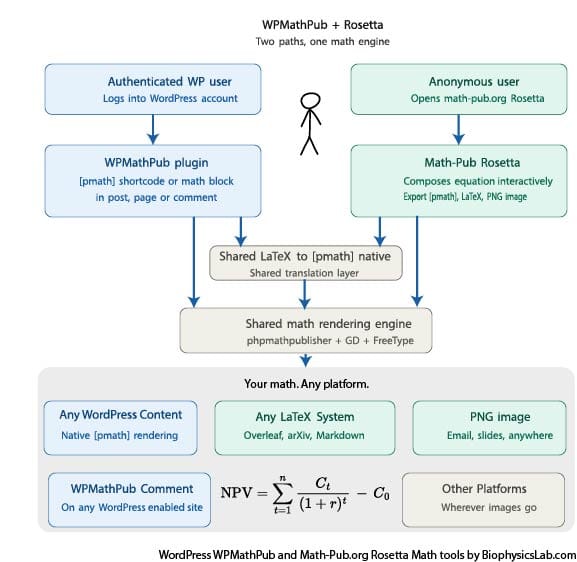
Starting with version 3.0.5 Rosetta is now bundled with WPMathPub.
Math-Pub.org’s Rosetta is a standalone app that uses the same LaTeX translation layer and PHPMathPublisher’s native publishing layer. So users can develop the same math equations with either platform.
Use WPMathPub:
- Publish Math as PNG images in your WPMathPub-enabled content.
Use Rosetta:
- Learn math syntax
- Export math results to WPMathPub-enabled content.
- Prepare equations for use in WPMathPub-enabled comments.
- Flexible publishing alternatives. Your math. Publish anywhere.
Mathematics is often promoted as endowing those who study it with a number of broad thinking skills … providing transferable skills which can be found across educational institutions, governments and corporations worldwide.
Cresswell C, Speelman CP (2020) https://doi.org/10.1371/journal.pone.0236153
Quick Start
Use these links to get the plugin and start publishing PNG equations on your WordPress site:
- Download the plugin from the WordPress site wordpress.org/plugins/wpmathpub/
- Use math-pub Rosetta to learn WPMathPub math equation syntax math-pub.org
- Option: review full syntax biophysicslab.com/wordpress-math-publisher-plugin/wpmathpub-syntax/
- Option: donate to support this plugin biophysicslab.com/wordpress-math-publisher-plugin/wpmathpub-support/
After installing the plugin, you can insert equations by placing pmath tags inside the block editor’s shortcode block, the classic editor, the interactive Gutenberg math block, or even inside standard text paragraph blocks, along with other text. Several examples are provided below. You can also optionally confirm a successful installation from the WPMathPub Admin Page>
WPMathPub Image Control and Typesetting Options
Here is an overview of the pmath controls to generate PNG images. See examples of basic and advanced native and LaTeX typesetting throughout this document.
Options to Control the pmath Shortcode Tag
[pmath size-control color-control pmath-syntax-processing]y=mx^2+b[/pmath]
Alternative option is the Math (WPMathPub) Gutenberg block. An interactive alternative to pmath tags in Shortcode. While the shortcode block has an occasional advantage as HTML code can be mixied with pmath tags. Note: pmath tags work in both the Gutenberg and Classic editors.
Optional PNG size control
Default size is 12, or site-wide selection from the tools menu.
Gutenberg block has a size slider.
Individual pmath tags can overide the default and select a custom size value:
size= , where
 ![x in delim{[}{8,24}{]}](https://www.biophysicslab.com/wp-content/uploads/wpmathpub/math-img/math_993_d5aada7edc2f5b25a8ce3debff4fde36.png "x in delim{[}{8,24}{]}")
Optional PNG color control
Default size is “black”, or site-wide selection from the tools menu.
Gutenberg block has an interactive color picker.
Individual pmath tags can overide the default and select a custom optional color value:
color=“#RRGGBB”, a valid six-digit hex color. Or “name” where name can be :
- black,
- white,
- gray/grey,
- red,
- green,
- blue,
- yellow,
- orange,
- purple,
- magenta,
- cyan,
- teal,
- navy
pmath syntax processing
Default is native pmath syntax (not LaTeX)
Gutenberg block has a switch to control native pmath vs. LaTeX processing.
Individual pmath tags can overide the default native syntax processing with an optional LaTeX syntax flag: latex=1
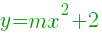
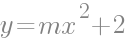
Example 1: Simple demonstration of color, size, native vs. LaTeX parameters
Enter a shortcode block like this…
[pmath color=”#009900″ size=16]y=mx^2+2[/pmath]
[pmath color=”gray” size=20]y=mx^2+2[/pmath]
[pmath color=”red” size=14 latex=1]y=mx^2+2[/pmath]
The result looks like this …
Results

Video: How to Use the pmath Tag
Example 2: Mix WPMathPub content with text to make a statement
Enter a shortcode block like this…
[pmath size=16 color=”#9900cc”](alpha+beta)^2=alpha^2+2{alpha}{beta}+beta^2[/pmath]
Where:
[pmath size=12 olor=”black”]~alpha[/pmath] is defined as a
[pmath size=12olor=”black”]~beta[/pmath] is defined as b
The result looks like this …
Result

Where:
 is defined as a
 is defined as b
Example 3: Demonstrate interactive WPMathPub Gutenberg block with syntax/size/color controls and help
Create and edit symbolic equations directly within the Gutenberg block: very useful for building an equation while learning pmath native vs. LaTeX syntax. The equation is generated in real-time as you type the syntax. For example, it took me a few attempts to align b over a properly until I tried the matrix command (used to structure layout, not as a matrix equation) as shown in the equation presented here.
![e^b-e^a =~ delim{[}{e^x}{]}matrix{2}{1}{b a} ~= int{a}{b}{e^x} dx](https://www.biophysicslab.com/wp-content/uploads/wpmathpub/math-img/math_967_fa3418af0820a212bd17594f9ac9e6df.png "e^b-e^a =~ delim{[}{e^x}{]}matrix{2}{1}{b a} ~= int{a}{b}{e^x} dx")
Example 4: Demonstrate a transparent PNG image on a black background (using WPMathPub Gutenberg block
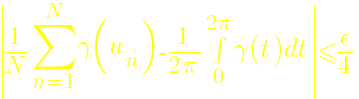
This example uses a yellow equation (20 px font size) and a black background. The color was selected and copied for reuse on the “Result:” text, so that both the title and equation match the same color. This example demonstrates the true transparency of the PNG equations – showing no halo effects.
Result:
Example 5: Support for gradient field operators
Several physics professors have asked me to implement a gradient feature. Now it is available – yay.
The new del (aka nabla) pmath symbol opens up div, grad, and curl discussions:
- Gradient on scalars:

- Divergence on vectors: •
- Curl on vectors: x

 •
• 
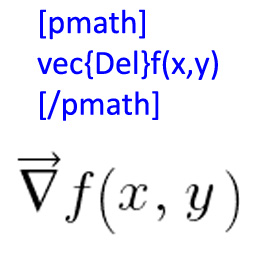
Include the vec pmath symbol with del to emphasize the operator’s nature as a vector:
Enter a shortcode block like this…
[pmath size=16]vec{del}f(x, ~y) ~ = ~ {partial{f}}/{partial{x}}hat{i} ~ + ~ {partial{f}}/{partial{y}} hat{j}[/pmath]

[pmath size=16]{del}f(x, ~y) ~ = ~ {partial{f}}/{partial{x}}i ~ + ~ {partial{f}}/{partial{y}} j[/pmath]
The result looks like this …
Result


Advanced Examples
Each of the examples below includes:
- An overview of the pmath symbols available with this shortcode,
- The final output is server-side PNG images,
- A link to the raw shortcode text. You can use these shortcode text examples as starter templates for your own math publishing needs.
Advanced Example 1: Show three polynomials grouped as a matrix and delimited with only a left-hand brace.
Show three polynomials grouped as a matrix and delimited with only a left-hand brace.
Enter a shortcode block like this…
[pmath size=24/]delim{lbrace}{matrix{3}{1}{{3x-5y+z=0} {sqrt{2}x-7y+8z=0} {x-8y+9z=0}}}{~}[/pmath]
The result looks like this …
Result:

Note: the use of delim to ensure the left brace covers the full height of the matrix. In this case, there is no corresponding right brace, so the equation ends with an empty delimiter coded to {~ }, and to ensure typography is maintained. You will know when the delimiter braces don’t match when you see unusual equation results.
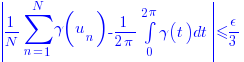
Advanced Example 2: Demonstrate summation, integral, subscripts, and fractions bounded by absolute value delimiters.
Enter a shortcode block like this…
[pmath color=”blue”]delim{|}{{1/N} sum{n=1}{N}{gamma(u_n)} – 1/{2 pi} int{0}{2 pi}{gamma(t) dt}}{|} <= epsilon/3[/pmath]
The result looks like this …
Result
Advanced Example 3: Demonstrate summation with sine and cosine trig functions.
Enter a shortcode block like this…
[pmath size=8]S(f)(t)=a_{0}+sum{n=1}{+infty}{a_{n} cos(n omega t)+b_{n} sin(n omega t)} [/pmath]
The result looks like this …
Result:

In this example, I purposely use a size=8 parameter. -the smallest usable size (and also the smallest size allowed during internal code checks) that is still readable.
Advanced Example 4: Demonstrate use of pi, infinity, integral, exponent, subscript, fraction, absolute value, matrix, delimiter, size control, and integration of text with math code.
Enter a shortcode block like this…
A formula : [pmath]delim{|}{{1/N} sum{n=1}{N}{gamma(u_n)} – 1/{2 pi} int{0}{2 pi}{gamma(t) dt}}{|} <= varepsilon/3[/pmath]
About pi :
- [pmath]pi=sum{n=0}{+infty}{{(n!)^2 2^{n+1}}/{(2n+1)!}}[/pmath]
- [pmath]pi=22/7-int{0}{1}{{x^4 (1-x)^4}/{1+x^2}dx}[/pmath]
- [pmath]pi=3/4 sqrt{3}+24 int{0}{1/4}{sqrt{x-x^2}dx}[/pmath]
[pmath]delim{lbrace}{matrix{3}{1}{{3x-5y+z=0} {sqrt{2}x-7y+8z=0} {x-8y+9z=0}}}{~}[/pmath] [pmath]delim{|}{matrix{3}{3}{a_{1 1} cdots a_{1 n} vdots ddots vdots a_{n 1} cdots a_{n n}}}{|}[/pmath]
The result looks like this …
Result:
A formula : 
About pi :





A note about HTML display in the upper box where <= is used to display <= in the documentation box above, but uses pmath syntax le in the equation itself. A maddening detail, but there are very few of these as outlined in the section below>
Advanced Example 5: Demonstrate a solution to a word problem using the Taylor series with an integral remainder and the Fourier series.
Suppose we wish to create a precise definition for a series that reads something like this:
If the sequence  has terms that get arbitrarily close to
  and stay that way, then there exists a natural number
  such that for all
  ,
,  .
.
In the marvelous sentence above, I use pmath latex=1 tags along with the standard text since the original science presented to me by Copilot AI used the same LaTeX typography.
Enter a shortcode block like this…
From now on :
Definition : [pmath size=18](u_{n})_{n in bbN}[/pmath] converges to [pmath size=18]l ~ doubleleftright ~ forall epsilon{gt}0, ~ exists p in bbN [/pmath] such that [pmath size=18] forall n{ge}p delim{|}{u_{n}-l}{|}{le}epsilon[/pmath]
Remark : in the case of a vector sequence, just replace [pmath size=18]delim{|}{u_{n}-l}{|}[/pmath] by [pmath size=18]delim{vert}{u_{n}-l}{vert}[/pmath]
Taylor series with integral remainder :
If [pmath size=18]f[/pmath] is a class, [pmath size=18]~ C^{n+1}[/pmath] is a class over the interval : [pmath size=18 color=”blue”] f(x)=f(0)+xf{prime}(0)+{x^{2}}/{2!}f{prime prime}(0)+…+{x^{n}}/{n!}f^{n}(0)+int{0}{x}{{(x-t)^{n}}/{n!}f^{(n+1)}(t)dt}[/pmath]
Fourier series :
Definition : Then we call the Fourier series of [pmath size=18]f[/pmath] : [pmath size=18]S(f)(t)=a_{0}+sum{n=1}{+infty}{a_{n} cos(n omega t)+b_{n} sin(n omega t)}[/pmath] with [pmath size=18]omega={2pi}/{T}[/pmath]
The result looks like this …
Result:
From now on :
Definition :  converges to
  such that
Remark : in the case of a vector sequence, just replace  by
by 
Taylor series with integral remainder :
If  is a class,
  is a class over the interval :
Fourier series :
Definition : Then we call the Fourier series of :  with
with 
Fix bug using “Greater Than” Symbol (>) in Gutenberg block editor
I found many “less than” perfect solutions to using the “greater than” symbol in shortcode blocks within the WordPress Gutenberg editor. I have chosen to fix this issue by using a new set of commands to replace >, <, >=, <=, and <>. Now users can enter these symbols using gt, lt, ge, le, and ne without any HTML conflict or potential bug in the Gutenberg block editor.
New handling of logic test symbols


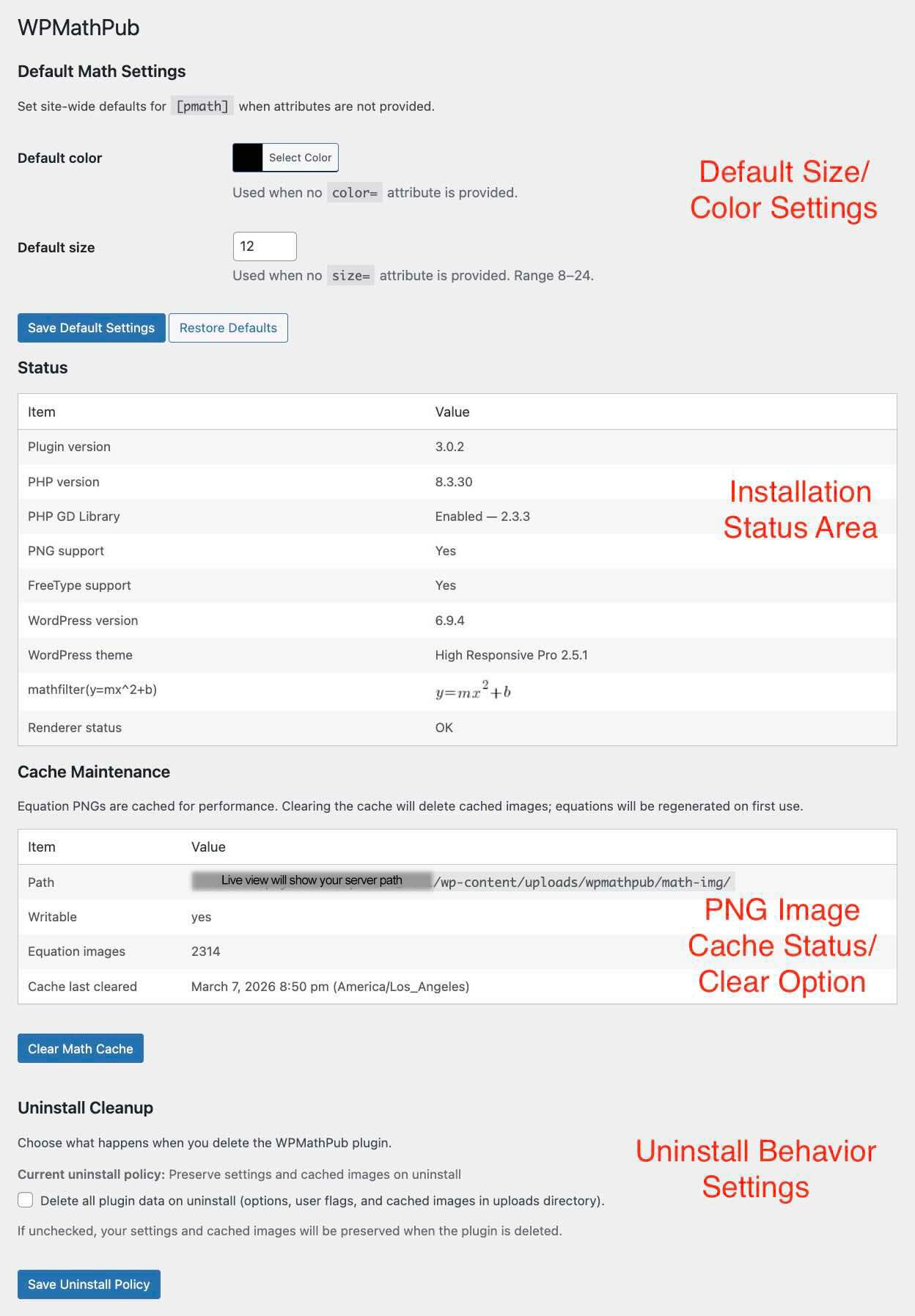
WPMathPub Admin Panel
Access the Admin Panel from Dashboard -> Tools -> WPMathPub
- Side-wide PNG default settings: size and color,
- Installation status: debugging tool,
- PNG cache control: path, clear images, and total images.
- Plugin uninstall policy: Keep or remove cache directory and WPMathPub metadata and options.
Engineering Overview
How WPMathPub Works
A clickable architecture diagram where each component maps to a detailed view with a description. Click any box to explore.
Click any component box to explore its detail diagram.
Code Architecture
WPMathPub Plugin Architecture
WPMathPub is a server-side math rendering engine for WordPress
Feature Set
- Converts math expressions → PNG images
- Supports both:
- Native pmath syntax
- Translated LaTeX input
- Cache rendered images for performance
- Salt on MD(pmath elements)
- Salt on WPMathPub version
Core Processing Pipeline
WordPress Post Content
        │
        ▼
[pmath] Shortcode Handler
        │
        ▼
Attribute Processing
(size, color, latex)
        │
        ▼
LaTeX Translation Layer (optional)
        │
        ▼
pmath Expression
        │
        ▼
mathpublisher Rendering Engine
        │
        ▼
GD + FreeType PNG Renderer
        │
        ▼
PNG Image Cache
        │
        ▼
 <img> returned to page
        │
        ▼
Rendered Equation Displayed in Post
LaTeX Intermediate Layer
LaTeX input
   ↓
Regex + str_replace rules
   ↓
pmath syntax
Featured Code Highlights
The heart of the code consists of a “wild” and Krellian IQ-enhancing regex that converts LaTeX-styled text between the shortcode pmath tags into a function call for use with the included PhpMathPublisher.php codebase.
A short segment from my wpmathpub.php PHP code shows how the math text between shortcode tags is filtered for use by PHPMathPublisher library…
// Create a WordPress math text filter suitable for PhpMathPublisher.php
function to_phpmath($content)
{
	// Add an optional font size attribute size=xx
	// Use preg_replace_callback instead of preg_replace /e in support of php 7
        $content = preg_replace_callback('#\[pmath(\s+size=|\s?)(\d*)(\])(.*?)\[/pmath\]#si', 'wpmathfilter', $content);
	return $content;
}
A PNG image is returned that replaces the original math-styled text during display. Because of the regex and the use of an image storage gallery for previously generated PNGs, the display of math equations is very fast.
A short code snippet from the PHPMathPublisher library shows how PNG images are inserted into WordPress pages…
function mathimage($text,$size,$pathtoimg)
{
/*
Creates the formula image (if the image is not in the cache) and returns the <img src=...></img> html code.
*/
global $dirimg;
$nameimg = md5(trim($text).$size).'.png';
$v=detectimg($nameimg);
if ($v==0)
	{
	//the image doesn't exist in the cache directory. we create it.
	$formula=new expression_math(tableau_expression(trim($text)));
	$formula->dessine($size);
	$v=1000-imagesy($formula->image)+$formula->base_verticale+3;
	//1000+baseline ($v) is recorded in the name of the image
	ImagePNG($formula->image,$dirimg."/math_".$v."_".$nameimg);
	}
$valign=$v-1000;
return '<img src="'.$pathtoimg."math_".$v."_".$nameimg.'" style="vertical-align:'.$valign.'px;'.' display: inline-block ;" alt="'.$text.'" title="'.$text.'"/>';
}
Database Architecture
WPMathPub Database Architecture
WPMathPub intentionally keeps a very clean database footprint
wp_options
- wpmathpub_default_color
- site default math color: hex value
- wpmathpub_default_size
- default font size: number from 8 to 24
- wpmathpub_cache_last_cleared
- cache maintenance SQL timestamp
- wpmathpub_activated_at
- plugin activation SQL timestamp
- triggers dashboard display for review/donation/dismiss after 7 days
- wpmathpub_delete_data_on_uninstall
- uninstall cleanup policy: 0=leave data, 1=remove data
SQL
SELECT option_name, option_value
FROM wp_options
WHERE option_name LIKE 'wpmathpub%';
SQL Results (typical)
wpmathpub_activated_at 1772748831wpmathpub_cache_last_cleared 1772945411
wpmathpub_default_color #000000
wpmathpub_default_size 12
wpmathpub_delete_data_on_uninstall 0
wp_usermeta
- wpmathpub_notice_dismissed
- trigger Dashboard request for review/donation/dismiss after 7 days
- value: 0
- conditions disabling dashboard request (leads to value set to 1)
- user clicks on donation button
- user clicks on review button
- user clicks on dismiss link
- no further request after any response by user
- exception: uninstall cleanup policy option active > user deletes plugin (not update) > user later reinstalls plugin
- trigger Dashboard request for review/donation/dismiss after 7 days
SQL
SELECT user_id, meta_key, meta_value
FROM wp_usermeta
WHERE meta_key LIKE 'wpmathpub%';
SQL Results (typical)
wpmathpub_notice_dismissed 1References
- Download the plugin from the WordPress site wordpress.org/plugins/wpmathpub/
- Open Rosetta: a standalone version of WPMathPub – demo included with WPMathPub – full version on math-pub.org
- Review full syntax biophysicslab.com/wordpress-math-publisher-plugin/wpmathpub-syntax/
- WPMathPub: Reliable LaTeX Math Rendering in Social Networks: https://www.biophysicslab.com/2026/04/11/wpmathpub-latex-math-in-social-networks/
- HEX code color picker for WPMathPub color selection: w3schools.com/colors/colors_picker.asp
- Wolfram Alpha is a powerful computational knowledge engine, great for math solutions and much more: https://www.wolframalpha.com/
- Glossary of mathematical symbols: https://en.wikipedia.org/wiki/Glossary_of_mathematical_symbols
- Donate to support this plugin: biophysicslab.com/wordpress-math-publisher-plugin/wpmathpub-support/
Credits (Software and Fonts)
- WPMathPub Plugin WordPress Math Publisher plugin – Ron Fredericks, Biophysics Lab – Copyright 2008-present (GPLv2)
- Rosetta – Math syntax training and cross-publishing tool – Ron Fredericks, Biophysics Lab – Copyright 2026-present (GPLv2)
- PHPMathPublisher – Pascal Brachet – France – Copyright 2005 (GPL)
- Latex fonts – Copyright (C) 1997 American Mathematical Society
- FreeSerif.ttf font – Copyleft 2002-10 Free Software Foundation
- lmroman10-regular.ttf font – GUST Font License (GFL)
This is a math equation in a comment

Here is the shortcode that created this equation (with spaces added to the pmath shortcode so the code will not be interpreted as math:
[ pmath size=16]y=mx^2 + b[ /pmath]